Orchestration
One coding agent hands parts of the work to other Claude Code and Codex sessions, waits for them and reads what they did. Every worker has a tmux window of its own, so you can watch each one from the desktop app, your phone or a browser.
One agent becomes the coordinator and hands parts of the work to other agents. Each worker is a real Claude Code or Codex session in its own tmux window, so you can look at it, and step in, from the desktop app, the phone apps or a browser like any other window. You usually ask once; the coordinator runs the commands.
studio-macthe coordinator's machine
build-boxanother machine on the account
Click a line for its handoffs, or a card for its terminal.
The drawing is a sample run: a coordinator on one machine, two workers beside
it and one on another machine of the account. Pick a line for the handoffs
along it, and a card for that worker's terminal. You start a run by asking the
agent you are talking to, for example
/sophonz:orchestrate tests to Codex, the README to Claude. A worker can also
run on another machine of your account, such as a Mac with the simulator. That
machine has to allow it first, with st orch accept-remote on.
Core model
- Run. One coordinator's piece of work: its objective, its workers and its
tasks.
st orch startmakes one; the firstst worker startorst task createmakes one when there is none. - Coordinator. The agent that hands work out and checks it. Any Claude Code
or Codex in a pane of a session st shares. It is a seat, not a fixed role at
the top: a coordinator can itself become another coordinator's worker,
bringing its workers along, and every conversation stays as it was. It then
shows
team of Nafter its name (st 0.3.88 or later). - Worker. A Claude Code or Codex session in a tmux window of its own,
started by the coordinator with
st worker startor adopted from an agent that was already running. It reports withst worker done. - Task. A named piece of work kept by st, which can wait for other tasks
(
st task create --deps). A worker takes it once what it waits for is done. - Decision gate. A question only a person should answer. The agent stops until you answer on the phone, in the desktop app or in the web terminal.
- Worktree. A git worktree and branch of a worker's own (
--worktree), so its files, builds and tests never mix with anyone else's. - Team. When a coordinator that works with workers of its own goes in as
another coordinator's worker, it and its workers become a team. Nothing
makes a team beforehand: the coordinator becomes the team's lead the moment
it is adopted, and
team of Nshows from then on. The lead keeps its own run and reports for the whole team, and depth inside the team is counted from the lead again (st 0.3.88 or later). See A team as a worker. - Subagent. Started inside Claude Code by its Task tool. It has no window; st only watches it.
How a worker differs from a subagent:
| Claude Code subagent | st worker | |
|---|---|---|
| Made by | the agent it runs in, as it goes | the coordinator with st worker start, or an agent already running, adopted |
| Context | empty each time | empty when started; the whole conversation so far when adopted |
| Runs in | the parent's process, out of sight | a tmux window of its own |
| Agents | Claude only | Claude Code and Codex, mixed |
| You can step in | no | yes: its window, the chat, the phone |
| The relation is kept | in the parent's transcript | by st, through a restart of st, and from st 0.3.88 a restart of tmux |
As a hierarchy: st looks after the tmux windows (the coordinator and its workers); a subagent is looked after by the agent it runs in.
- coordinatorClaude Codetmux window
- worker 1Codexsttmux window
- worker 2Claude Codesttmux window
- subagentworker 2's Claude Codeno window; st only watches
- worker 2's workersttmux window, two levels below the coordinator: as deep as one run goes
- leadteam of 2sta coordinator with two workers of its own that was adopted, so they became a team: one worker to the coordinator above, and its own run
- worker acounted from the lead again
- worker b
- worker 3ci-mac/%7sttmux window on another machine
A badge is what looks after it: st for every window, the agent itself for a subagent.
-
Depth is counted two ways (st 0.3.88 or later):
- Inside a run (one coordinator and its workers, a team): at most two levels below that run's coordinator.
- The whole chain, where teams took in teams: at most four levels from the top coordinator to the deepest worker, across machines too.
An adopted team keeps its own run and counts from its own lead, which is why adopting a team can make the whole thing deeper than two levels. st 0.3.87 and earlier counted everything as two levels below the top coordinator.
-
The agent graph shows a subagent under its agent's card with a thin line. Codex has no subagents.
Under the hood
- A worker is a tmux window st opens.
st worker startopens a window named after the worker in the coordinator's session and startsclaudeorcodexthere, in the coordinator pane's folder. See Workers. - st types the task in. Once the agent's input box is up, st types one line: the task is in this file, read it and do it. It never types over a permission prompt or another screen, and it checks the line went in.
- The hooks confirm the start.
st worker startreturns only after the agent's hooks show it has started its turn. The same hooks tellst worker waitwhen a worker is working, waiting for input or done. - The relations survive a restart of st. Who handed work to whom stays
through a restart of st, and goes when the pane closes. A run's objective and
its workers' reports stay in
~/.sophonz/orch/<run>/run.json. - The relations follow their agents. When the tmux server goes down and st restores the sessions, the panes come back with new ids. From st 0.3.88 st finds each coordinator and worker again within about ten seconds and puts the relations back, and an agent's hook refuses commands that would stop tmux by accident. See After a tmux restart.
- Workers report. A worker that is done runs
st worker done --summary "<what it did, and how it checked>"; the coordinator reads that and the worker's last answer withst worker read. st also tells the coordinator: between its turns, a line saying the worker is done and how to read it is typed into its pane (st 0.3.92 or later).
Set up
It needs tmux (on Windows, psmux; see below), st 0.3.67 or later running, and the agents' hooks.
st hooks install      # first: st sees through the hooks that a worker has started
st plugin install     # the Claude Code plugin and the Codex skills
After that, new Claude Code sessions get /sophonz:orchestrate, and Codex gets the sophonz-orchestrate
and sophonz-worker skills. See Agent skills and the plugin.
Then open Claude Code in a pane of a session st shares and ask:
/sophonz:orchestrate Give the API tests to Codex and the README cleanup to another
Claude, then check both results and tell me.
The coordinator then runs something like:
st orch start --objective "API tests and README cleanup"
st worker start --agent codex  --name api-tests --task api-tests.md
st worker start --agent claude --name readme    --task readme.md
st worker wait --timeout 15m      # until both are done
st worker read api-tests          # a worker's last answer and its summary
Screens that show workers
- Window lists. A worker is an ordinary tmux window with a name, so it shows
in the desktop app's sidebar, the phone apps' window lists and the web
terminal's window tabs, and counts in
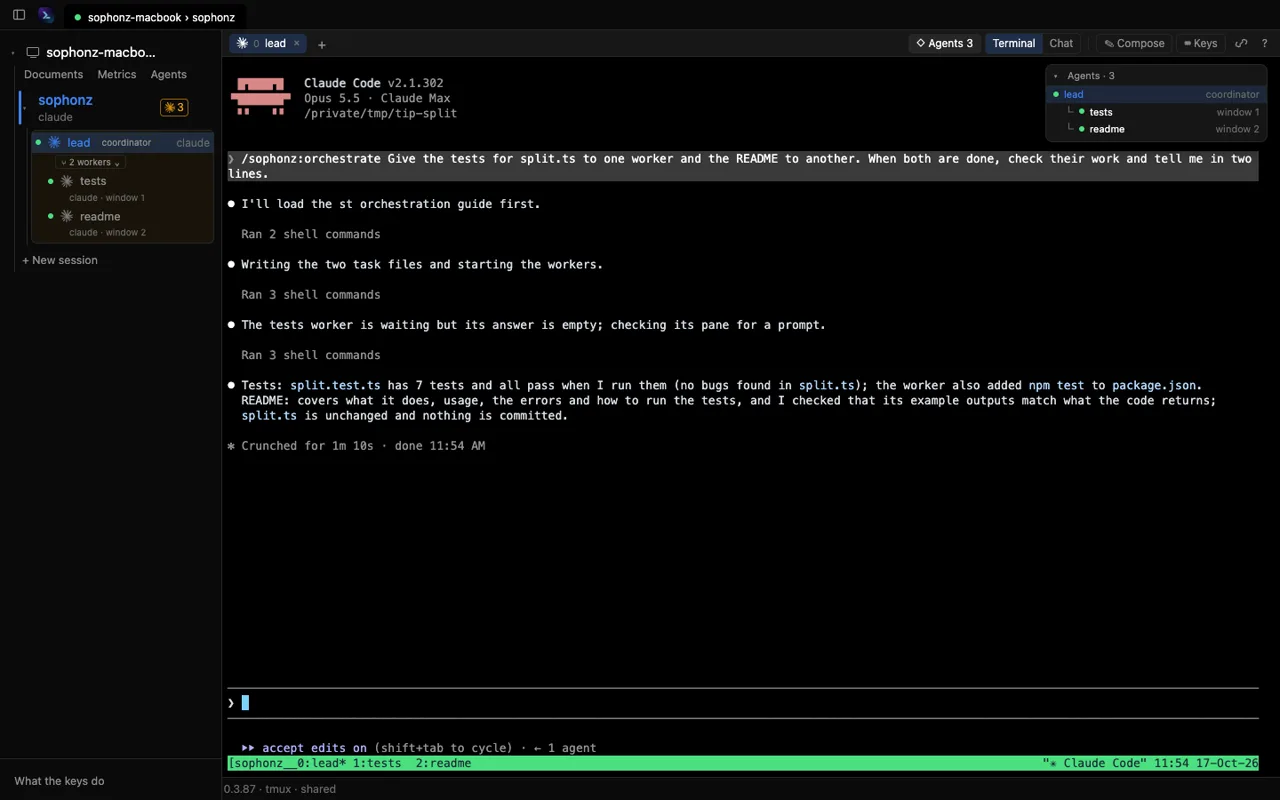
st ls'sAGENTS. Its state dot and notifications are those of any other agent, and a gate reaches the phone as a push with the options as buttons. - The desktop app's agent graph. On this computer's sessions that have any delegation, the pane header carries ◇ Agents and the number of nodes (⇧⌘G, Ctrl+Alt+Shift+G on Windows and Linux). A thick green line runs from the coordinator to each worker, the cards say which is coordinator and worker, and a finished worker's card has its summary. A working card has a bright border and a pulsing dot. Click a card to go to its pane; drop an agent's card on another's to adopt it. The same graph has Claude agent teams and subagents. Desktop app 0.1.17 or later (adopting 0.1.21); see Desktop app.
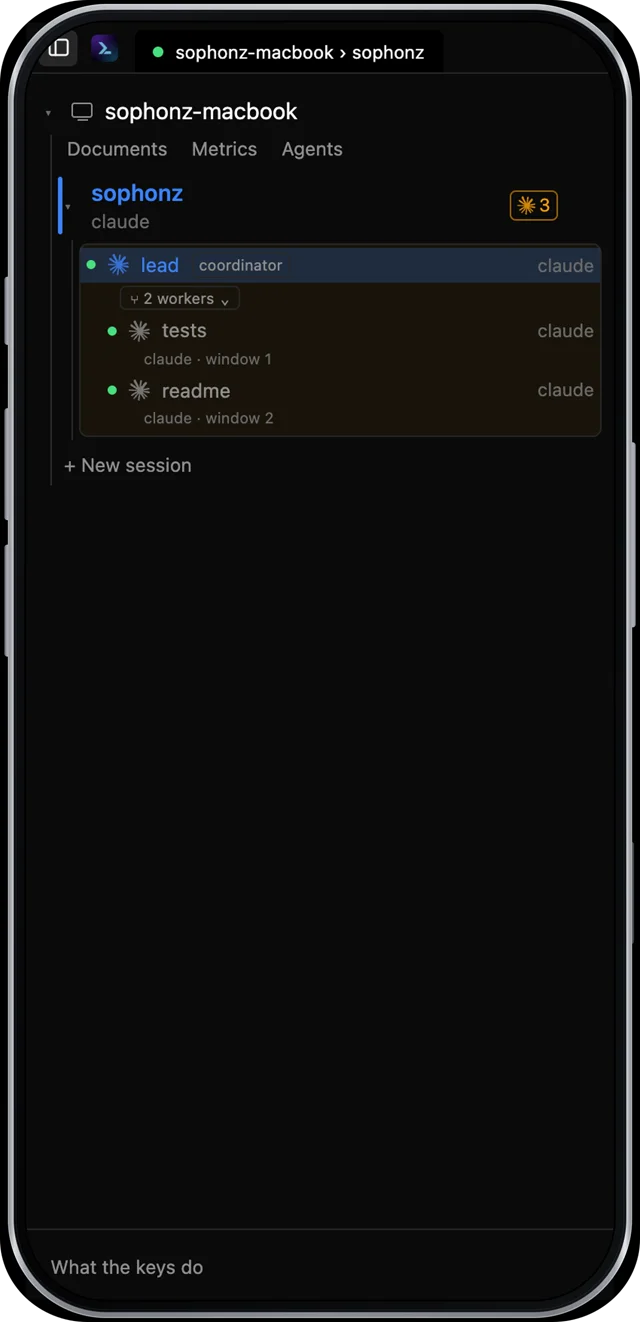
- The sidebar card. In the desktop app and the web terminal a coordinator
and its workers share one card: a
coordinatorbadge on its row, and under it a head line such asWorkers · 2 working, 1 donethat folds the workers. It starts open. Finished workers go into aCompleted (N)group at the end, closed until you open it. A worker on another machine has a machine icon and a↳ parent · machinemark. Drop a window row on another agent's row to adopt it; let go from the row's menu. Desktop app 0.1.31 or later; in the web terminal, dropping to adopt from st 0.3.85 and the shared card from st 0.3.86. See Adopting an agent.- The card is drawn as a tree: a thin guide line runs down from the
coordinator to each of its workers. A worker that leads a team of its own
gets a box a gray step stronger, its workers indented under it, and
team of Nafter its name, as in the agent graph. Cards are a neutral gray; the agent's color stays on the dots and icons. Rows in a card leave out the agent's command name. - Only the window in front in that app or browser tab is lit, with a brighter outline around it and its card; a window another client has in front (a phone, another attach) is not.
- A worker whose coordinator is gone (its pane closed, or tmux restarted before st found it again) stays in the list with ⚠, which coordinator is gone, and Release.
- A click on another session's row goes to that session; a click on the session in front folds it, and the small ▾/▸ folds any row.
- Desktop app 0.1.33 or later, and the web terminal from st 0.3.88. The team labels need st 0.3.88 on the machine.
- The card is drawn as a tree: a thin guide line runs down from the
coordinator to each of its workers. A worker that leads a team of its own
gets a box a gray step stronger, its workers indented under it, and
- The web terminal. On a session with delegation, an Agents card at the
terminal's top right lists the coordinator and its workers with their state;
click one to go to its window (st 0.3.85 or later). ◇ Agents in the panel
header opens the same agent graph as the desktop app's, and a worker's card
there has
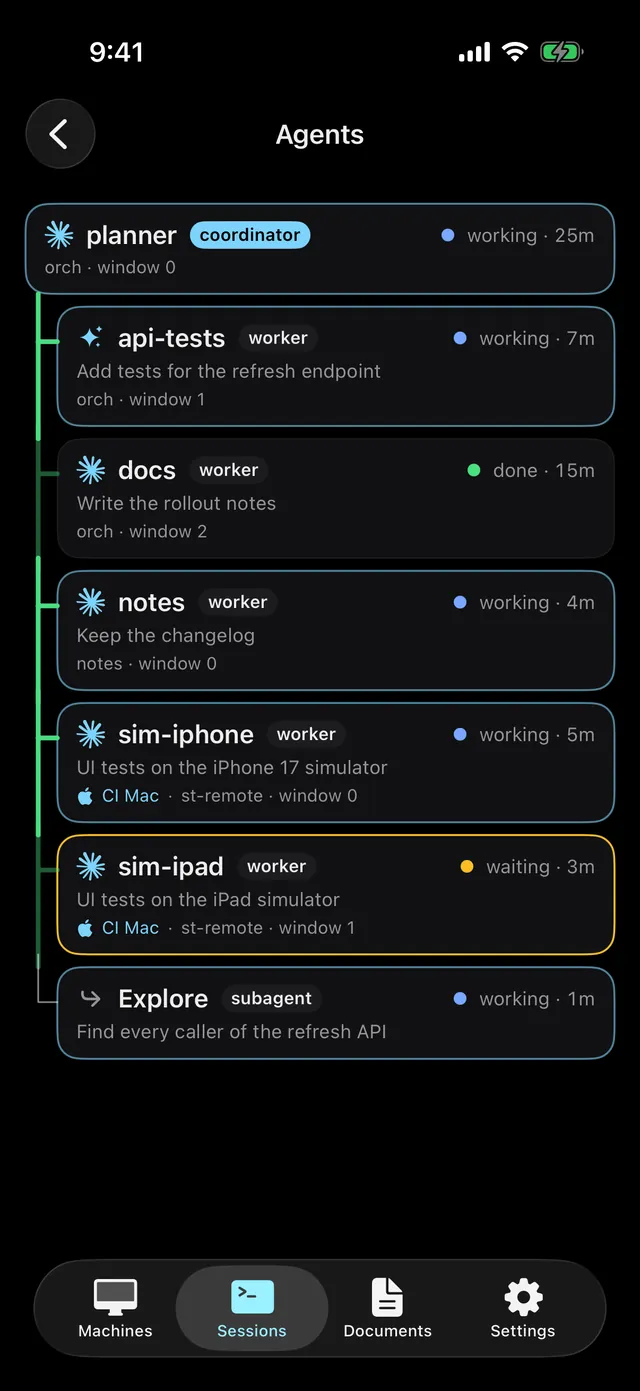
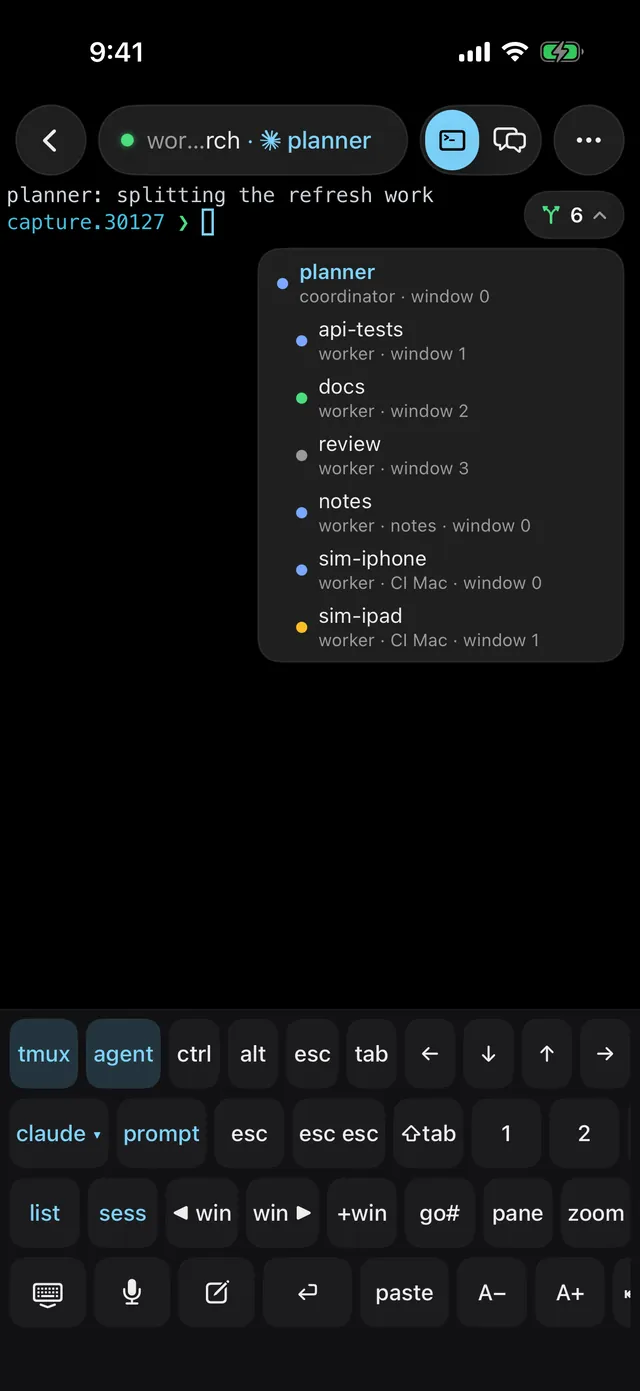
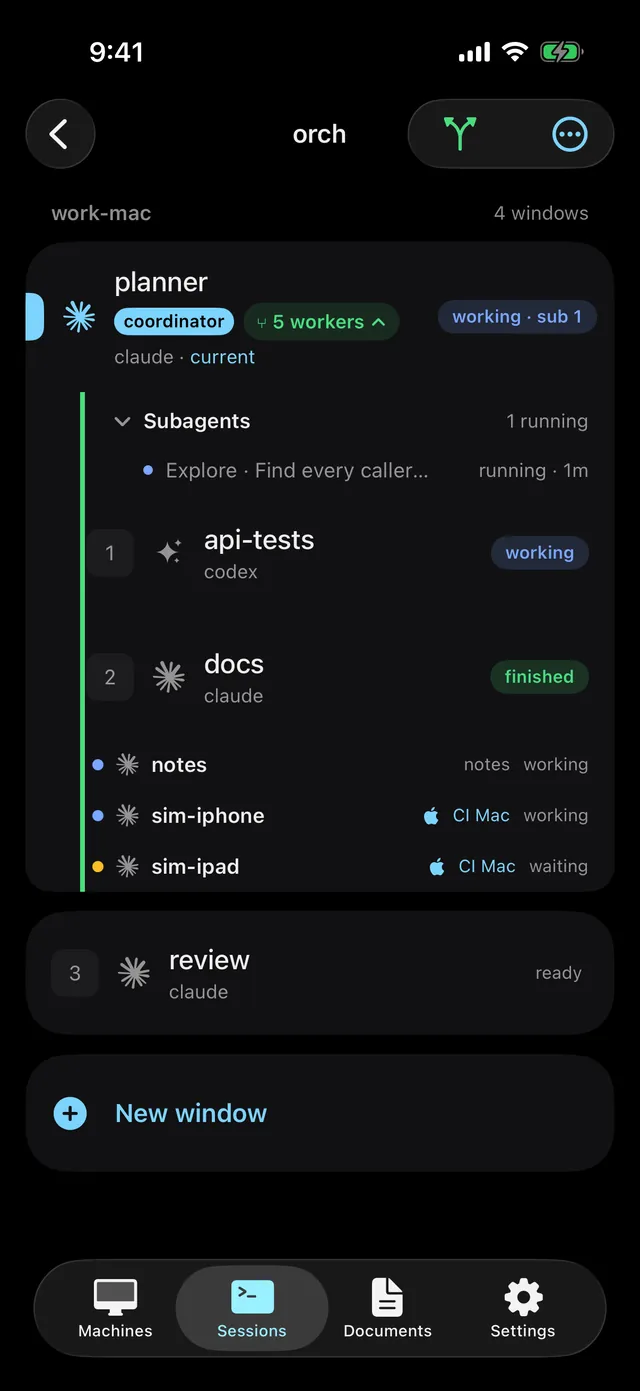
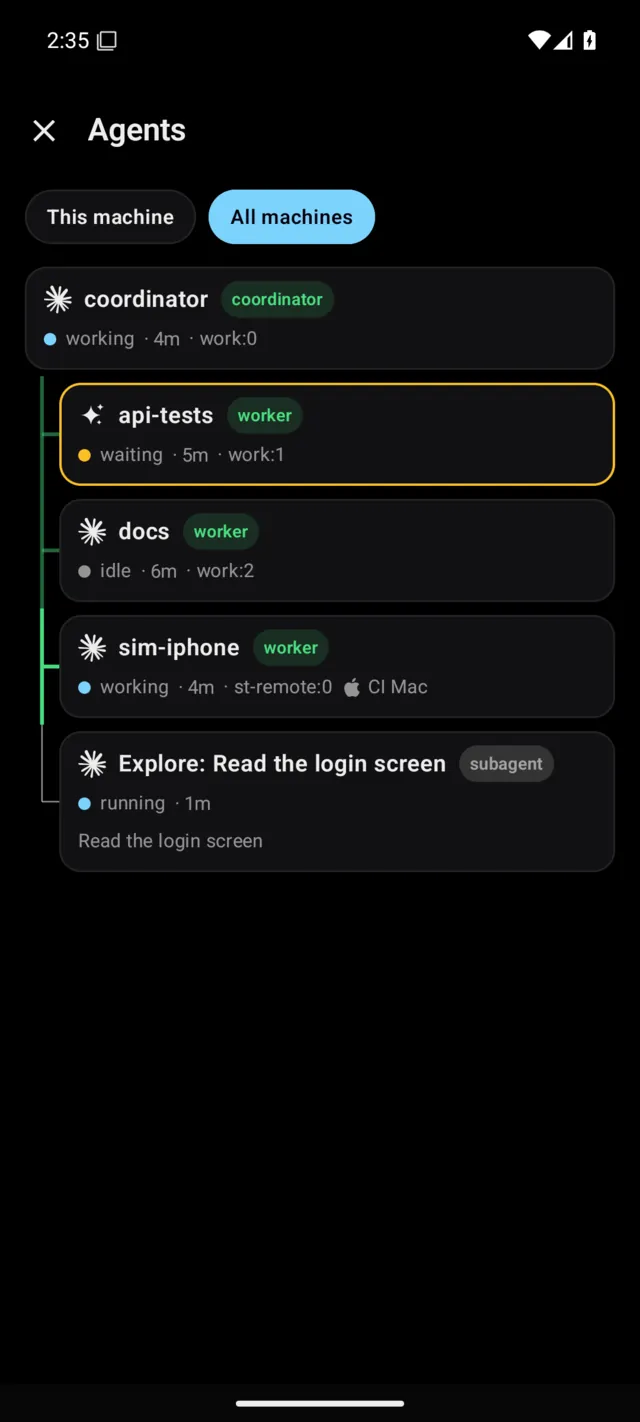
Release(st 0.3.87 or later). Both show the agents on the account's other machines too, and a click opens their window there (st 0.3.92 or later). - The phone apps. The Agents chart, the window lists and the terminal's Agents card; see On the phone: the Agents chart. Long-press an agent for Make a worker of… or Release; see iPhone and Android.
On the phone: the Agents chart
The iPhone and Android apps show who handed work to whom as a tree of cards, top to bottom. The coordinator is at the top, with its workers, teammates and subagents indented below. The lines are thick green for st workers, blue for agent teams and thin grey for subagents, strong only while the one below works. Each card has the agent's icon, its name, coordinator, worker, subagent or teammate, its state and how long it has been in it; an agent on another machine carries that machine's icon and name.
- Opening it. The Agents N chip on a machine screen's status line (the whole machine), the workers button above the window list of a session with delegation, and Agents in the terminal's menu.
- Scope. Pick This window (when opened from the terminal), This session, This machine and All machines (when signed in) at the top. Workers and coordinators on other machines join the same tree either way, with their machine's mark. With no delegation it says "No agent is handing work to another."
- Tap. A card with a pane opens that machine's terminal at that window and
pane, opening the other machine first when it is elsewhere. A subagent or
teammate card shows its kind, state, parent, start and the path
Main › parent › this. - The terminal's Agents card. When the agent in the window on screen is a coordinator or a worker, a ⑂ N pill sits at the terminal's top right. Tap it for the coordinator and its workers; tap a row to go to that pane. It never covers the key bar.
- Window lists. A coordinator's window card carries coordinator and a ⑂ N workers pill that folds the workers under it. Workers on the same machine are indented beneath it, with their session's name when it is another session.
The machine needs st 0.3.70 or later (the graph and adopting), and 0.3.85 or later for other machines. From iOS v0.1.93 and Android v0.1.94.
Commands by goal
| You want to | Use |
|---|---|
| Tell one agent you are watching something | Type in its window, or use Chat or Compose in the apps |
| Hand a piece of work to a new agent and get a report back | st worker start --agent claude|codex|opencode|pi --task <file> |
| Hand work to an agent that already knows the code | st worker adopt <id>, then st worker send |
| Work that has to go in order | st task create <name> --deps a,b, then st task wait and st task start (Tasks) |
| Keep workers out of each other's files | --owns "<paths>" or --worktree |
| Try one task several ways and keep the best | st worker start --fan 3 …, then st worker pick <id> |
| Work that needs another machine, like its simulator | st worker start --machine <machine> … (Workers on other machines) |
| A decision only you should make | st gate ask (Decision gates) |
Every st command, with all its flags, is in the st command reference.
Good to know
- It needs tmux. On Windows st uses psmux 3.4.0 instead (st 0.3.97 or later): a running agent there can be adopted as a worker, but st does not start new workers on Windows. zellij and no multiplexer have no workers. The commands work only while st runs, inside a pane of a session st shares.
- New workers start in the coordinator's session (with
--machine, in that machine'sst-remotesession). An adopted worker may be in another session or on another machine. - Without the hooks st cannot see a worker start, and
st worker startfails after 30 seconds. Runst hooks installfirst. - A trust or login screen in a folder the agent has not opened before keeps the
task from being typed. It fails after 90 seconds and leaves the window open:
get past the screen there, or close it with
st worker stop <id> --yes. - Workers can start workers, down to two levels below their run's coordinator, and the whole chain is at most four levels (st 0.3.88 or later).
- st's Claude Code hook refuses an agent's
tmux kill-serverthat names no server or names the one the agent runs in, andpkillorkillallof tmux (st 0.3.88 or later). Codex agents are not checked yet. - If you type
st worker startyourself in a shell, the worker shows in the graph, but a shell is not an agent, so no line is drawn from it. - In the apps and the graph you can look, adopt and let go. To talk to a worker, use its window or the chat.
In this section
- Workers: starting, waiting, reading, adopting.
- Tasks, ownership and worktrees: order, what each worker may change, several tries.
- Decision gates: questions for you.
- Workers on other machines: a worker on another machine of your account.
- Agent skills and the plugin: what teaches the agents the commands.