Your first multi-agent session
From a machine running st to one Claude Code handing work to two workers, watching them finish, and reading its report.
One Claude Code becomes the coordinator. It gives two parts of a task to two workers, each a real agent in a tmux window of its own, waits for them, checks what they did and tells you. This takes about ten minutes the first time.
Requirements
- A machine running
st0.3.67 or later (Install, thenst).st versionsays which you have. - Claude Code installed and signed in on that machine. Codex too, if you want a Codex worker.
- Something to watch from: the desktop app, a
phone app, or the browser link
stprinted.
1. Install the hooks and the skills
st hooks install      # st sees each agent's turns; it checks through them that a worker started
st plugin install     # the Claude Code plugin and the Codex skills
The second puts the skills in: Claude Code gets /sophonz:orchestrate, Codex
gets the sophonz-orchestrate and sophonz-worker skills. They apply to
sessions started afterwards, so quit a Claude Code that was already running.
2. Open Claude Code in a shared session
Open the machine's session in the desktop app, or run st attach in a
terminal on the machine. Go to the project and start Claude Code:
cd ~/src/my-project
claude
It has to be a pane of a tmux session st shares: that is where the workers'
windows will open. If Claude Code asks whether to trust the folder, answer it
now. The workers start in the same folder, and a trust screen there would
stop them.
3. Ask
/sophonz:orchestrate Give the tests to one worker and the README cleanup to
another. Check both results and tell me.
Name the agents if you care which: "give the tests to Codex and the README to
another Claude". The coordinator writes down a task for each worker and runs
st worker start, which opens a window, starts the agent and types the task
into it. You do not type any st worker command yourself.
4. Watch the workers appear
Each worker gets a window in the same session, named for its part. Open one and you see the agent at work, as in any other window.
- Desktop app. In the sidebar the coordinator's window has a head line,
Workers · 2 working, open the first time, with the workers' windows under it; finished ones gather underCompleted (N).◇ Agentson the pane header (⇧⌘G) opens the agent graph: a green line from the coordinator to each worker, and a summary on each finished card. - Phone apps. In the session's window list the coordinator's window has a
coordinatorbadge and⑂ 2 workersover its workers' windows, each with its state dot. The green button at the top opens the Agents chart: the coordinator on top and a green line to each worker. In the coordinator's terminal a⑂ 2card at the top right lists them; tap one to go to its window. A worker that stops on a question sends a notification like any other agent. iPhone app 0.1.93 or Android app 0.1.94 or later. - Web terminal. The sidebar shows the same
Workers · 2 workinghead line as the desktop app, and an Agents card at the top right lists the coordinator and its workers with their state (st0.3.85 or later). Click one to go to its window.
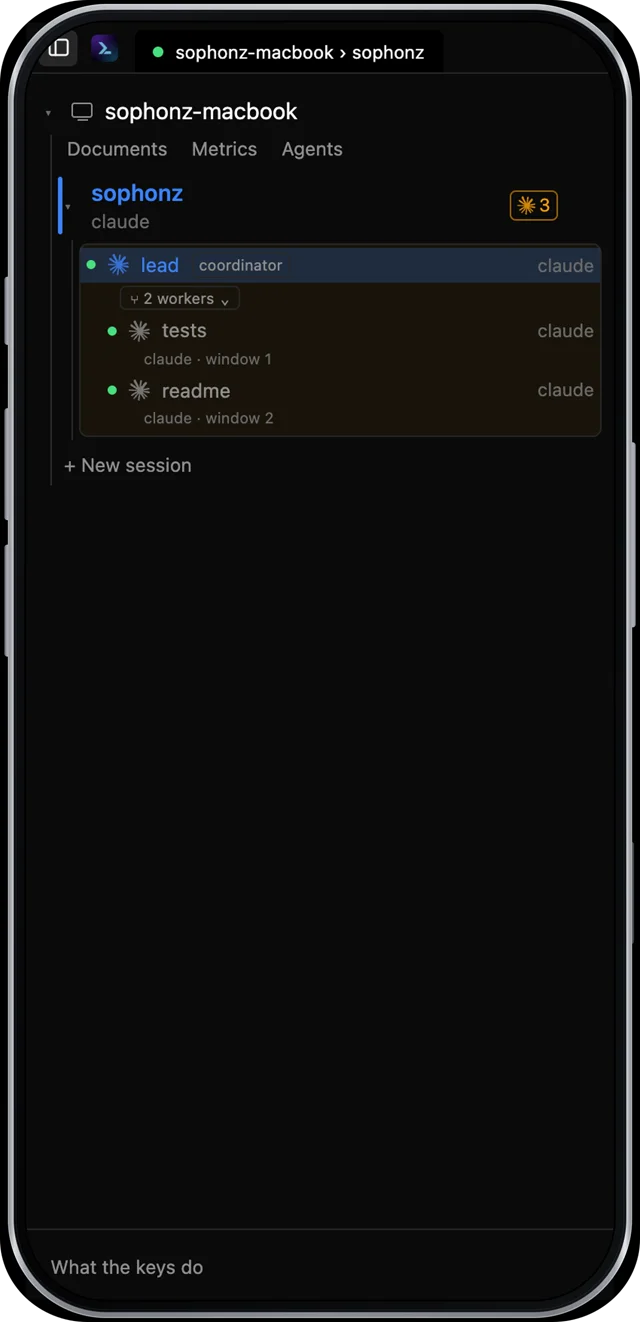
When a worker needs a decision it asks in its answer and stops. The coordinator reads it and answers, or asks you in its own pane. A permission prompt in a worker's window is yours to answer, from the window or from the notification.
5. Read the report
When both are done, the coordinator reads each worker's answer and summary, checks them against the task (running the tests it named), and reports in its own pane.
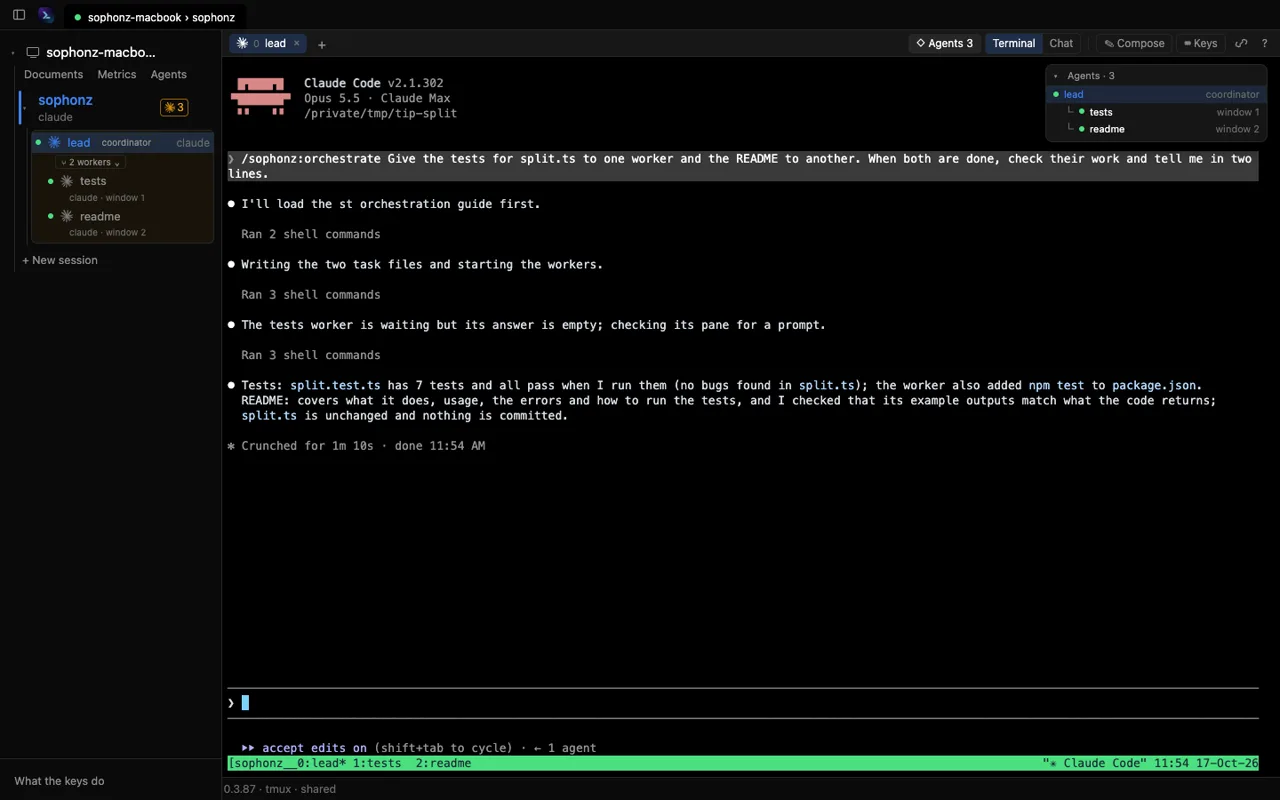
If something is missing, say so to the coordinator. It sends the worker more
work with st worker send rather than starting again.
6. Close the workers
The workers' windows stay open after the report, so you can read what each
did. When you are finished, ask the coordinator to close them, which it does
with st worker stop <id> --yes, or close their windows from the app (it
asks first). Both workers changed files in the project folder; review them
with git as usual.
Agents already at work, as workers
Instead of starting new workers, the coordinator can take on agents that are already talking in windows of their own. Nothing is started again, so each keeps the code it has read and the conversation it has had.
-
Open a window per agent in a session st shares, start Claude Code or Codex in each, and talk to them as usual.
-
In the window that is to coordinate, ask with the agents' ids. Each window's
echo $TMUX_PANEgives its id, and so does the sidebar./sophonz:orchestrate Adopt %1 and %2 as your workers; both have read split.ts. Give the tests to %1 and the README to %2, and when both are done, check and tell me in two lines. -
The coordinator runs
st worker adopt %1andst worker adopt %2and sends each its work withst worker send. From there it goes as in steps 4 and 5.
In the desktop app, dragging a window's row in the sidebar, or an agent's
card in the graph, onto the coordinator adopts it too. st worker stop does
not close an adopted worker. When it is done, st worker release <id> lets
it go back to its own conversation. See
Bring a long conversation in as a worker.
Next
- Orchestration: tasks in order, what each worker may change, a worktree per worker, decision gates.
- Workers on other machines: a worker on another machine of your account.
- Race three agents on one task: the same task to several workers, and keep the best.