st ui
The machine in one terminal screen, as k9s shows a cluster -- your machines, sessions, windows, agents and their runs, documents and CI, with any st command a colon away.
In st ui, the account's machines and their sessions and windows, the coding
agents in them and their orchestration runs, the machine's vault, the CI of
each checkout, the agents' plan limits and the machine's CPU and memory are all
in one screen, read again every 2 seconds. It reads the same share the apps and
the web terminal read, so it needs st to be sharing on this machine. It is in
st 0.4.0-rc and later; for now that is the release candidate channel, so get it
with st upgrade --channel rc.
Opening it
st ui            # starts on the machine tree
st ui agents     # or on any view by name
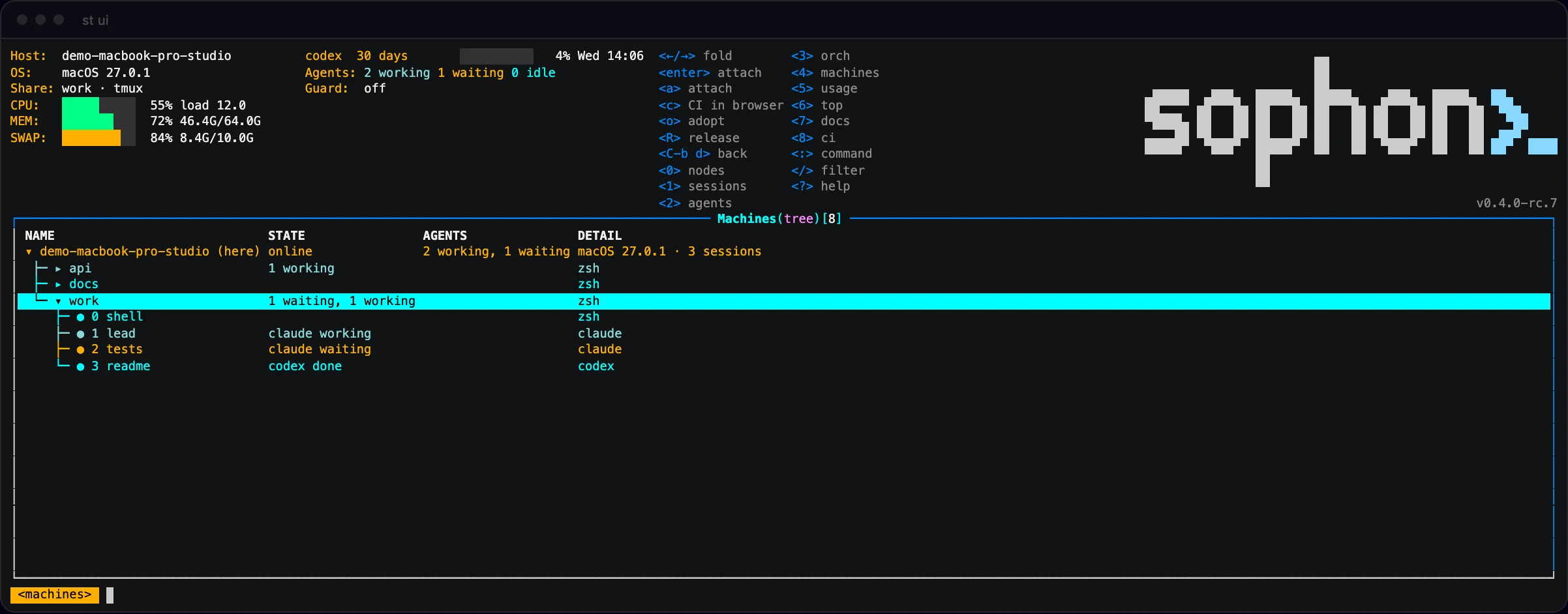
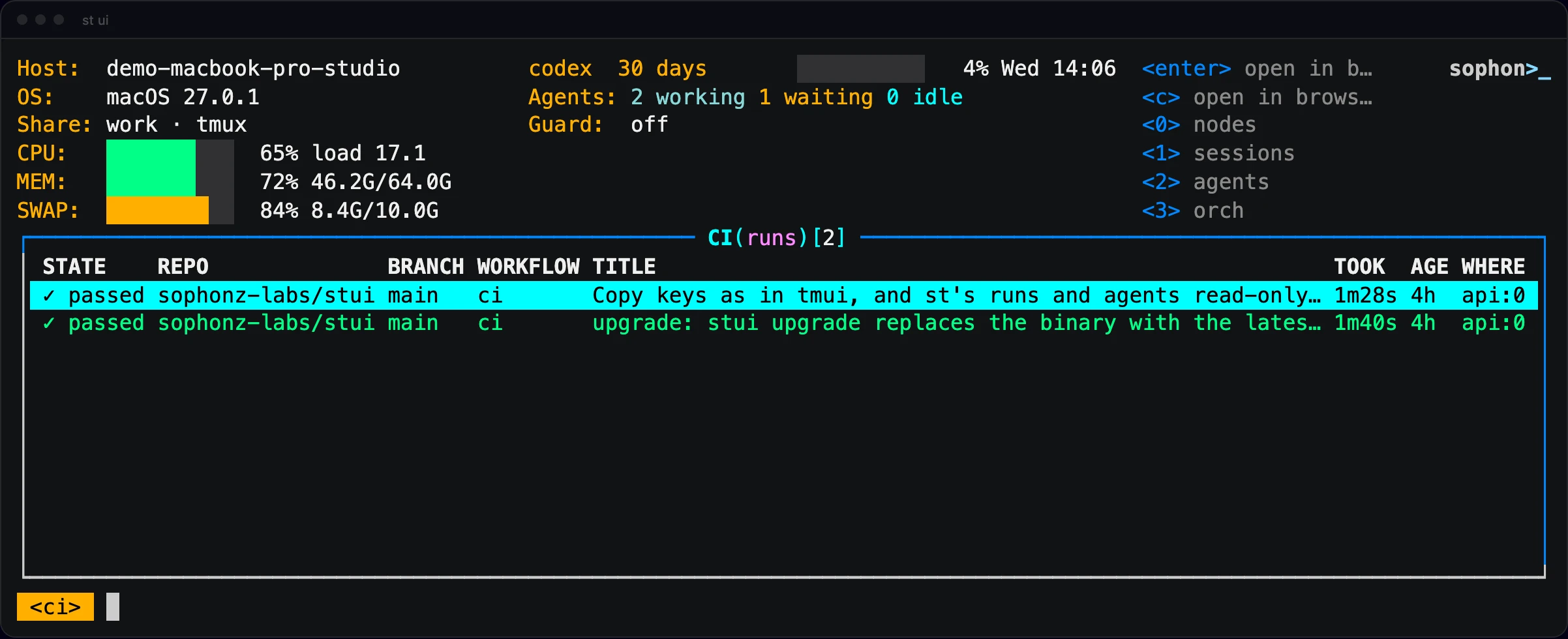
The header is the machine on the left (host, OS, the shared session and its
multiplexer, CPU, memory and swap), the agents in the middle (plan usage, how
many are working, waiting and idle, and whether the usage guard is on), and on
the right the keys of the view you are in. The line at the bottom is the way
you came in (<sessions> <windows> <panes>) and the last thing that happened.
The machine tree
st ui starts on a tree of the account's machines, as a Kubernetes view shows
its nodes: machine, then session, then window. This machine is at the top with
(here), then the others, online first. Machines start unfolded and sessions
folded. →/l unfolds, ←/h folds or goes up to the parent, space
switches. A machine that is offline keeps its row and says when it was last
heard from.
Enter or a on a session or a window attaches to it. On another machine that
is st attach <machine>/<session> --window <n>, through that machine's own
link as the apps go. A window in a checkout shows its CI, and c opens that run
in the browser.
Views and keys
A digit, or : and the view's name, switches views.
| Key | View | What it lists |
|---|---|---|
0 | :nodes | The machine tree, the first screen |
1 | :sessions | This machine's sessions: windows, agents and their state, who is attached, age, current window |
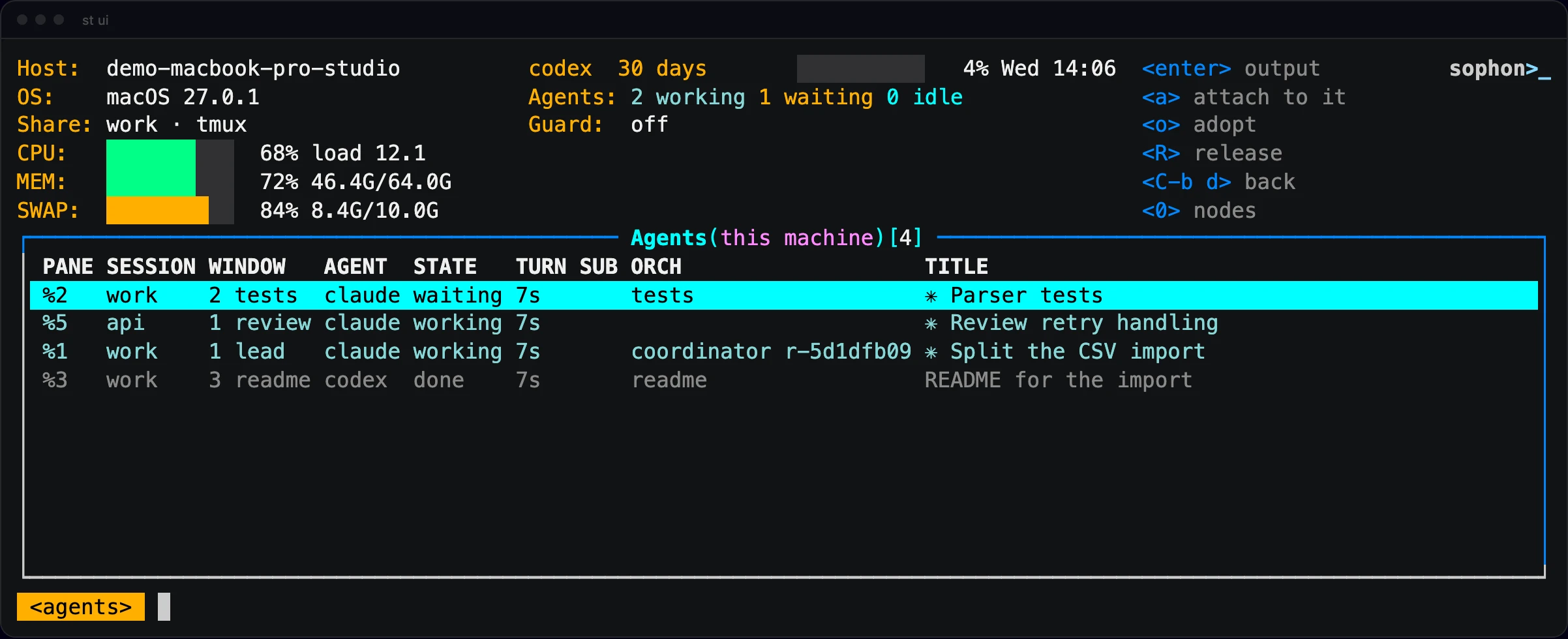
2 | :agents | Every agent pane, the urgent ones (waiting, error, working) first |
3 | :orch | Orchestration runs as a tree: run, coordinator, workers and their workers |
4 | :machines | The account's machines as a list |
5 | :usage | Claude Code's and Codex's plan limits and when they reset |
6 | :top | CPU, memory and swap over the last ten minutes |
7 | :docs | The machine's vault: session folder, window folder, note |
8 | :ci | The latest GitHub Actions runs of this machine's checkouts |
Enter goes into the row: a session to its windows, a window to its panes, a
pane to its output (the last 2000 lines, following the end). :windows [session]
and :panes [session] go straight there.
Keys that work everywhere:
| Key | |
|---|---|
j k ↑ ↓ | Up and down |
g G | Top and bottom |
ctrl-b ctrl-f | A page up and down |
Enter | Into the row |
esc | Back, or clear the filter |
/ | Filter the rows |
ctrl-r | Read everything again now |
? | Help, with the keys of this view |
q | Back; at the top, quit. ctrl-c quits from anywhere |
And each view's own:
| View | Keys |
|---|---|
| Machine tree | ←/→ fold, Enter or a attach, c CI in the browser, o adopt, R release |
| Sessions | p panes, a attach, n new session, ctrl-d kill it (asks first) |
| Windows | a attach, c CI in the browser, n new window (an agent's name, or blank for a shell), ctrl-d close it (asks first) |
| Panes, agents | a attach to that pane, o adopt, R release |
| Orchestration | ←/→ fold, r the worker's last answer (st worker read), d its diff (st worker diff --stat), a attach, o adopt, R release, ctrl-d stop the worker (asks first) |
| Usage | g turn the usage guard on or off |
| Docs | ←/→ fold, Enter the note's source |
| CI | Enter or c open the run in the browser |
st ui never types into a pane. To tell an agent something, attach to its pane
with a.
Orchestration
3 shows each run as a tree: the run, its coordinator, the workers, and their
workers, folded and unfolded like folders. A worker whose coordinator is on
another machine stands on a branch of its own under the run. A done worker is
grey with ✓, a waiting one orange, a working one teal.
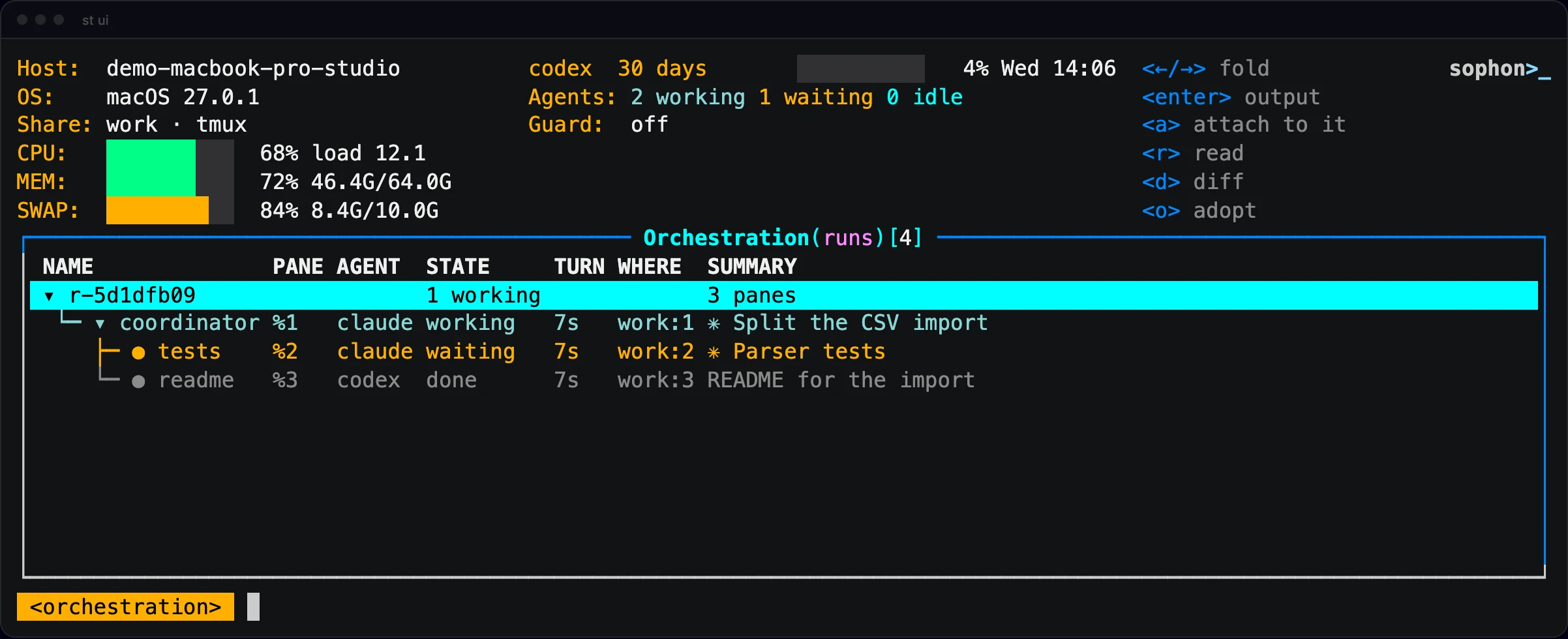
o brings an agent into a run as a worker and R lets it go, the same as
st worker adopt and st worker release. They work on pane rows and on a
window in the machine tree, an agent on another machine included. o asks for
the parent from this machine's agents and a line for its role, and shows what
it is about to do before it does it.
Attaching and coming back
a hands this terminal to st attach on that session, with the window or pane
you were on picked. A line says how to come back just before it attaches, and
the hint bar keeps <C-b d> back.
| Where st ui runs | Attached to | Back to st ui |
|---|---|---|
| Outside tmux | This machine | Ctrl-b d (zellij: Ctrl-o d) |
| Inside tmux 3.3 or later | This machine | Ctrl-b d: the session opens in a popup over st ui, and detaching closes it |
| Inside tmux older than 3.3 | This machine | Ctrl-b L, tmux's key for the last session |
| Anywhere | Another machine | Ctrl-b d, or ~. at the start of a line |
Documents and CI
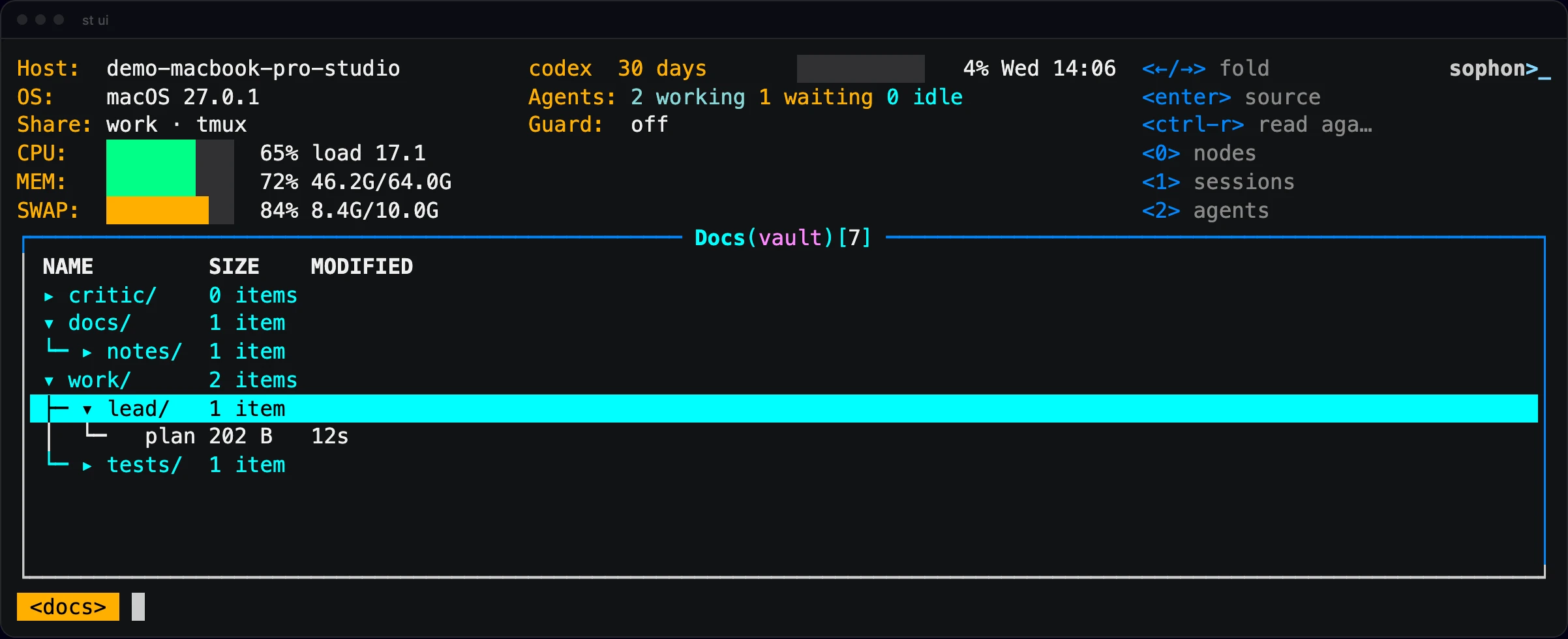
7 shows the machine's vault as a tree, folders folded, with the files that
start with a dot (.obsidian, .st, .briefs) left out as Obsidian does.
Enter on a note shows it as it is on disk, front matter and all.
A window in a checkout shows the latest GitHub Actions run of its branch:
running, ✓ passed, ✗ failed. 8 lists the latest runs of every checkout on
this machine, running ones first, and Enter or c opens one in the browser.
Over ssh or without a screen it shows the address instead. The command st ci
is now :st ci, since :ci is this view.
Commands with :
: takes a view's name, or any st command: :doc ls, :worker list,
:upgrade, :login, :st ci, :history. st ui gives the terminal to that
command, then waits for a key and comes back. :st <command> works too, and
Tab completes view names and st commands. :q quits.