On a small screen
Keys a soft keyboard has not got, gestures, and Hangul.
Scan the QR code st prints with the phone's camera, or open its link, and the session opens in the phone's browser — no app. It is the same session the computer is in.
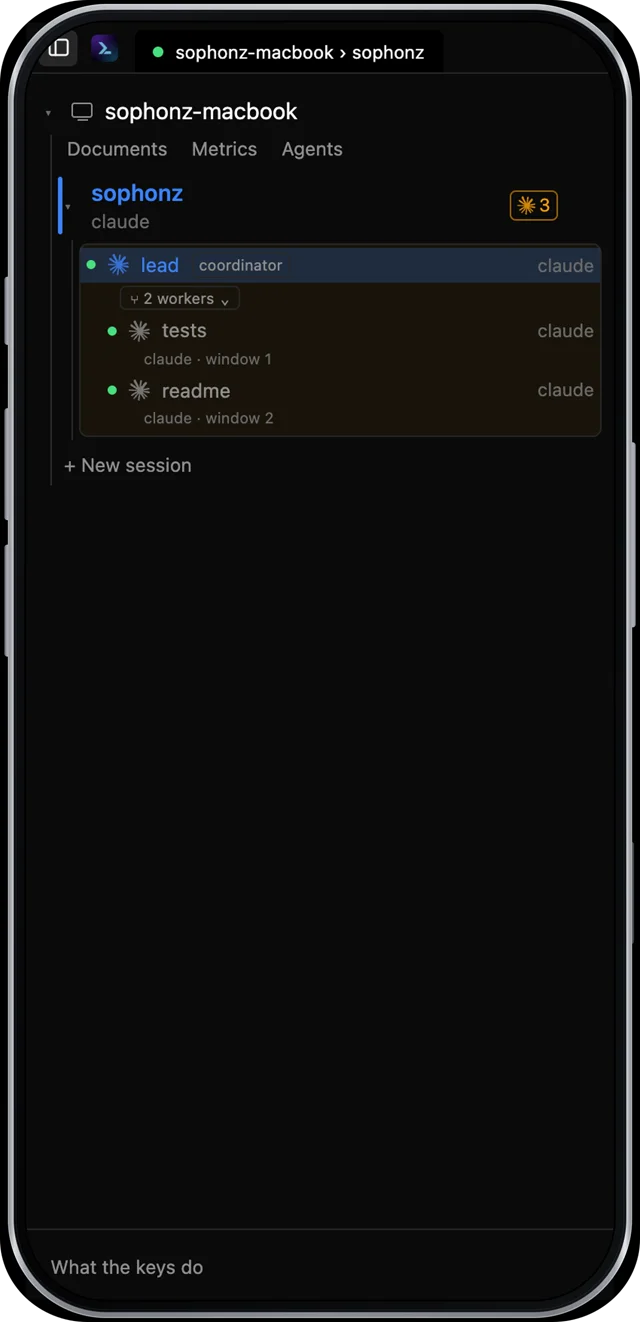
The screen is the desktop app's, as in a desktop browser (st 0.3.77 or later): the title bar, the window tabs and the sidebar with the machine's sessions and their windows. In a window 700px wide or less the sidebar opens over the terminal at full width rather than beside it, and the terminal under it keeps its size, so nothing reflows when it opens and closes; the button at the top left of the title bar opens and closes it. What a phone adds is the key bar and the bottom navigation below. A read-only link keeps the plain page, with no sidebar. Whether the device counts as touch is decided by its pointer; ?bar=1 on the link makes it touch, with the key bar, and ?bar=0 makes it not, which gives the desktop browser's page.
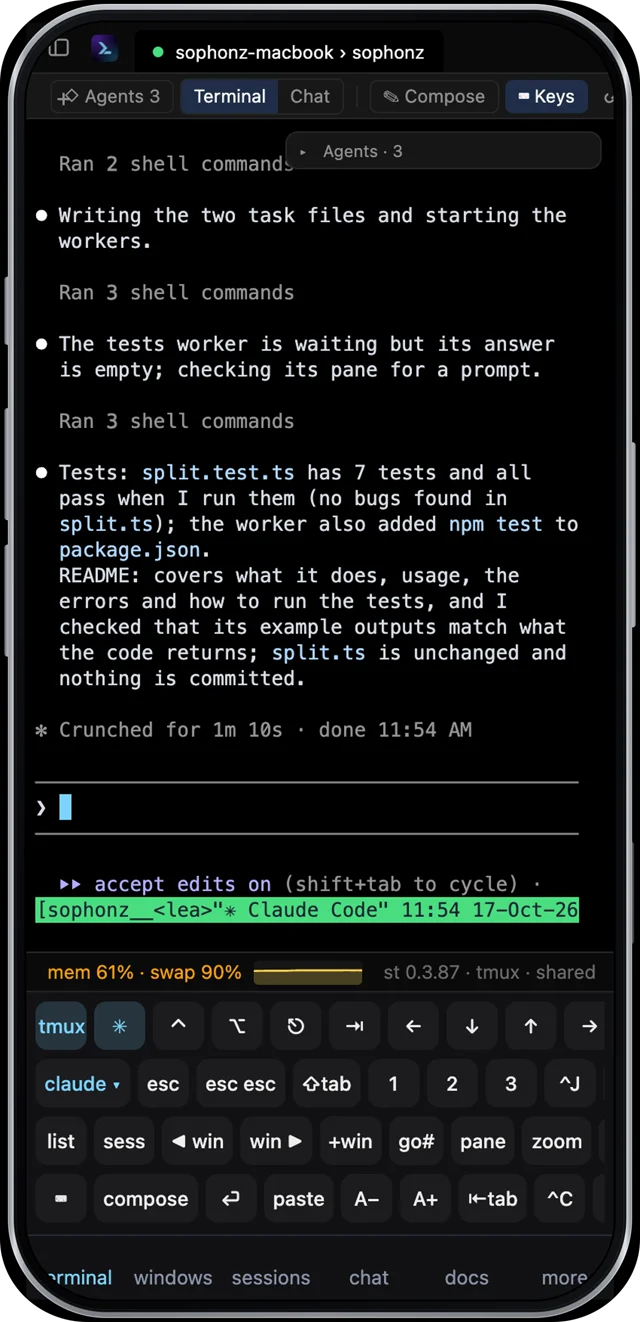
A soft keyboard cannot produce Ctrl, Alt, Esc, Tab, arrows or function keys. A touch key bar sends those byte sequences directly.
ctrl and alt apply to the next key when tapped once and stick when tapped twice. Keys fire on release, not on touch, and a key whose finger moved is cancelled.
The rows come in the apps' order: the first has the tmux and agent toggles, ctrl, alt, esc, tab and the arrows; then the agent's keys, tmux's, and the rest. When the first row does not fit, ctrl, alt, esc and tab become ⌃ ⌥ ⎋ ⇥.
The last row starts with ⌨ and compose. ⌨ puts the keys away (the bottom navigation stays) and leaves a keyboard button at the bottom right that brings them back. compose opens a box for a long prompt: Enter is a new line there, Send sends the whole thing as one message, and Type only types it without pressing Enter. Closing it keeps the draft, one per window.
A− and A+, in the last row, set the type size — 8 to 28px, remembered on that device. A pinch does the same thing.
A tablet (an iPad, in either orientation and with or without Safari's desktop website setting) gets the same screen, with no bottom navigation. The key bar starts put away there; the keyboard button at the bottom right or ⌨ Keys in the panel header brings it up. In a Split View 700px wide or less the sidebar opens over the terminal, as on a phone.
On a phone the key bar ends in a bottom navigation, as the apps have: terminal, windows, sessions, chat, docs and more. Each opens its sheet and lights up while it is open; closing the sheet lights terminal again. chat is there when st reads the agents' transcripts, and shows the agent in this window's pane as chat, as on a computer (see In a desktop browser). more has the machine's metrics, copy the session's link, the keys, what's new (st's releases since this page last showed them, st 0.3.92 or later), a new session, my machines and sign out. my machines opens the account's machines in a sheet (st 0.3.85 or later); pick one and it opens in the same tab. While the soft keyboard is up the navigation goes and the key bar has the bottom to itself.
In the list sheet, a window split into panes says how many it has and opens on a map of its layout: each pane where it sits, with its program and its agent's state. Tap one to go there. On a phone that pane fills the screen (tmux zoom), and the zoom goes back when you leave the window or close the page; Open whole window opens it as it is. This needs st 0.3.60 or later.
Gestures
| Gesture | Effect |
|---|---|
| Tap | raise the keyboard |
| Drag up / down | scroll the scrollback |
| Swipe left / right | previous / next window |
| Pinch | font size, same as A− / A+ |
Hold an arrow or del | key repeat after 400ms |
| Tap the status pill | back to the session list (the pill shows only when something is wrong, or on a read-only link) |
Only a tap raises the keyboard: it comes up when a finger lifts without having moved, so scrolling does not bring it up.
Hangul
Some phone keyboards send one compatibility jamo per key into the terminal rather than composing, so 조직 arrives as ㅈㅗㅈㅣㄱ. A 두벌식 automaton composes those into syllables. A terminal has no preedit, so the syllable in progress is rewritten in place with DEL.
A working IME delivers finished syllables and never reaches the automaton. ?hangul=0 turns it off.