Workers
Starting a worker with st worker start, writing its task file, a worker's obligations, waiting for it, reading and sending, a worker's name, and making an agent that is already running a worker (adopting).
A worker is a Claude Code, Codex, opencode or Pi session in a tmux window of
its own that works for another agent (opencode and Pi from st 0.3.113). The coordinator starts a new one with
st worker start, or adopts an agent that was already running. These commands
are usually run by the coordinating agent, not by you. They need st 0.3.67 or
later and the hooks (st hooks install); adopting needs st 0.3.70 or later.
Starting a worker
st worker start --agent claude --name api-tests --task api-tests.md
st worker start --agent codex --task -            # the task from stdin
--agent is claude, codex, opencode or pi.
What st worker start does:
- It copies the task file to
~/.sophonz/orch/<run>/<name>.mdand adds the worker's obligations at the end (report withst worker donewhen finished). - It opens a new window named after the worker in the coordinator's session and starts the agent there, in the coordinator pane's folder.
- Once the agent's input box is up, it types one line, "your task is in this
file, read it and do it", through st's chat send. The file it names is a
copy inside the project, which every agent reads without asking: in a
checkout
.git/st/<run>/, in a worktree.st/<run>/(st adds/.st/to the repository's.git/info/exclude, sogit statusstays clean). In a folder without git it names the file in~/.sophonz/orch/(st 0.3.102 or later). It never types over a permission prompt or another screen, and it checks the transcript to see the line went in. - It reports success only after the hooks show the worker has started its turn.
If the line cannot be typed within 90 seconds (a trust or login screen in a
folder the agent has not opened before), it fails and leaves the window open:
get past the screen there, or close it with st worker stop <id> --yes. If the
turn does not start within 30 seconds of the line going in, it fails too; that
usually means the hooks are not installed.
More flags:
--name <name>the window's name and the task file's. Kept to lower-case letters, digits and-, cut at 24. Without it the task's first line names the worker, and a name already taken gets a number.--splita pane beside the coordinator instead of a new window.--cwd <dir>the folder the worker works in.--owns "<paths>"and--worktreekeep workers apart; see Tasks, ownership and worktrees.--machine <machine>starts it on another machine of your account; see Workers on other machines.
Workers can start workers of their own, down to two levels below their run's coordinator, and the whole chain of agents handing work down, from the top coordinator to the deepest worker, is at most four levels. st counts both, across machines too, and refuses a worker that would go deeper ("too deep"). A team adopted as a worker is a run of its own, so its workers count from its lead. This is st 0.3.88 or later; st 0.3.87 and earlier counted two levels below the top coordinator, for everything.
Writing a task file
Write the task file so it can be worked from alone:
- the target: files, component, command
- the change to make
- the constraints
- what this worker may edit, and what other workers own
- the evidence that it is done: a test or a command to run
A worker's obligations
- When it is done, it checks the acceptance criteria and reports:
st worker done --summary "<what it did, and how it checked>". - If it cannot finish, it says so:
--outcome failedonst worker done, or a summary that starts withblocked:(read as failed).--outcome succeededis the default (st 0.3.113 or later). - If it needs a decision, it asks in its answer and stops. The coordinator reads
that answer and replies with
st worker send. To keep working once it has the answer, it can ask withst worker question "<question>", which waits for the coordinator'sst worker reply(below). When only a person should decide, it opens a decision gate instead. - With a worktree of its own, it commits its work on its branch before it reports.
The worker learns this from the end of its task file and from
st skills get worker. Claude Code and Codex also get it from
st plugin install; opencode and Pi have no plugin, so the task file's ending
points them to st skills get worker (from st 0.4.0 also st --skill, the
guide for that agent in one read).
Waiting, reading and sending
st worker wait --timeout 15m      # every worker of this pane
st worker wait %15 %16 --any      # as soon as one of them matches
st worker read %15                # its last answer and its done summary
st worker send %15 "Also cover the error path."
st worker send %15 --file brief.md   # a long brief, kept as a document
st worker list                    # this pane's workers
st orch history                   # what was handed to whom, and who finished
st worker stop %15 --yes          # close its pane
st worker wait [id…] waits until the workers are done or need input. With no
ids it waits for every worker of this pane.
--anyreturns as soon as one worker matches.--for done,waiting,idlewhich states to wait for. All three by default; a closed worker (exited) always counts.--timeout 15m15 minutes by default. Running out is not a failure: look atst worker listand wait again.--check-in 3mcomes back after that long with each worker's state, how long it has been so and its title, and leaves them running. It exits 2, as a timeout does (st 0.4.0 or later).
It exits 0 when they are done, 3 when one is waiting for input, and 2 on
timeout. A worker that is idle counts as finished, and st worker wait says
so next to it: read its answer.
A worker is in one of five states:
| State | Means |
|---|---|
working | its agent is on a turn |
waiting | it is asking: a question, a permission, a gate |
done | it reported with st worker done |
idle | its turn ended without st worker done |
exited | its pane is gone |
st worker read <id>prints the worker's last answer (what it wrote after the last prompt) and itsdonesummary.st worker send <id> "<text>"says more to it, through the same chat send, checked to have gone in. A wait after a send waits for the worker to start and finish a new turn, even if it still carries the done mark from earlier work (st 0.3.83 or later). It does not send when the agent in that pane is not your run's worker, which can happen with an old id after a restore; it prints your workers' ids instead, and--forcesends anyway (st 0.3.90 or later).st worker send <id> --file <file|-> ["<note>"] [--title T]sends a long brief: st keeps an unchanging copy of it and a document, and types one line into the worker that points at it.--doc <doc>sends a document this machine already keeps the same way (st 0.3.93 or later).- What could not be typed waits in an inbox. When a send cannot go in now
(someone is typing in that box, or a question is on screen), it is not a
failure: the work waits in the worker's inbox and st types a pointer there
between its turns,
[st] 2 messages for you -- st worker inbox. The same goes for a worker's done and idle news to its parent.st worker inboxshows what is owed to this pane and marks it taken;--peekonly shows,--ack <id>or--ack-allmarks without showing, and--waitwaits until some comes (st 0.3.113 or later). - A question that waits for its answer.
st worker question [<id>] "<question>"asks another pane (by default this worker's coordinator) and waits for the answer, 10 minutes by default (--timeout, up to 30m); it exits 2 when none comes, and--resume <question id>waits again. The pane asked answers withst worker reply <question id> "<answer>"(st 0.3.113 or later). - The parent is told. When a worker runs
st worker done, or its turn ends without it, st types a line into the nearest parent still at work, between its turns: the worker is done, andst worker readit (st 0.3.92 or later). It counts as told once the parent's agent has taken it. st orch historyshows what was handed to whom and when, who finished and who was told;--run <run>,--all,--limit N,--json(st 0.3.92 or later).st worker listshows this pane's workers: id, name, window, state and task. The workers under each worker show below it, as a tree;--depth 1shows only this pane's own (st 0.3.90 or later). A team's lead whose workers are not shown has(team N)after it, and a worker whose coordinator pane is gone has(parent gone); one whose pane no longer exists islost: adopt it again where it runs (st 0.3.97 or later).--alllists every worker, of every run, those on other machines included.st orch statusis the same list. Before st 0.3.88 it listed the workers of this pane's run, whoever started them.st worker stop <id> --yescloses the pane of a worker st started, in your run. It does not close an adopted one.
A worker's id is its tmux pane id (%15) or the name st worker list shows
(api-tests); one on another machine has the machine in front (ci-mac/%15,
ci-mac/api-tests). A name is looked for among this pane's workers and theirs
first, then every worker on the machine. When two workers have the name, st
does nothing and lists them; use the id. Names work in st 0.3.90 or later. st worker on its own prints the usage. Every orch and worker command takes --json.
Flag values follow a space: --name api-tests. The full list is in the
st command reference.
Handoffs are kept
A brief sent with st worker send <id> --file is not typed into the
worker's window. st keeps it as a file and types one line that says where it
is (st 0.3.93 or later):
A message from coordinator is in /path/to/project/.git/st/<run>/sent/20261021-025532-web.md ("Title", 4.1 KB). Read it and do it.-
The copy is kept in
~/.sophonz/orch/<run>/sent/, named for when it was sent and to which worker:<YYYYMMDD-HHMMSS>-<worker>.md. The line names its copy inside the worker's project, as for a task (see Starting a worker). It is never written over, and the brief is a document on the machine as well. -
A long brief does not fill the worker's input box or the terminal's scrollback, and its text never goes through a shell.
-
st orch historylists the run's handoffs, when, what kind, from whom to whom, and the title:10-22 02:49:01 done terminal-go %12 → st-desktop %13 1. st set — PR #126… -
The history also has every change to the tree: an agent adopted, released, renamed or given a role, with who asked and its parent before and after (st 0.3.98 or later).
-
The History tab beside the agent graph shows the same record, newest first, in the desktop app (0.1.39 or later) and in the web terminal (st 0.3.98 or later). Pick a card to see only its events. A line opens its handoff document, or the copy st kept when the document is gone or has changed.
A worker's name
A worker's name is a label. st worker start takes it from --name or the
task's first line; an adopted agent gets its tmux window's title, written the
same way. It does not say which machine the worker runs on: a window someone
titled "Windows CI" makes a worker called windows-ci, and that can be an agent
on a Mac. The machine is the part before the / in a remote id (ci-mac/%7),
and nothing else.
To give a worker a name that says what it does (st 0.3.96 or later):
st worker rename %15 ios-tests
st worker rename ci-mac/windows-ci ios-ci # ci-mac/%7 is ios-ci now (was windows-ci)- It takes every id form:
%15, a name,ci-mac/%7,ci-mac/<name>, for workers st started and adopted ones alike. - The name is written the way
--nameis: lower case, and anything but letters, digits and-becomes-, soiOS CIisios-ci. A name over 24 characters is refused, not cut. - A name another worker has is refused (case ignored), with that worker's id. So is a name that is one of the account's machines: its slug, name or hostname.
- The run's records keep the new name, so it comes back after a tmux restart. An adopted worker takes its window's title again only when it is released and adopted again.
- The tmux window keeps its title. The window is yours and can hold other panes, so from then on the name and the title can differ.
For a worker on another machine, see Renaming a worker there.
Making an agent you were talking to a worker (adopting)
st worker start starts a new agent with an empty context. If an agent has
already been talking with you and has read the code, it can become another
agent's worker as it is. Nothing is started again, so what it knows from the
conversation stays. It may be in another session. This needs st 0.3.70 or
later.
In the desktop app and a browser. In the sidebar, drag the window row of the agent that is to work and drop it on the window row of the agent that is to direct it. In the desktop app you can also drop an agent's card on another's in the agent graph. What the drop shows, where it is refused, how the sidebar looks afterwards and how to let a worker go are in Adopting an agent in the desktop app's guide. Desktop app 0.1.31 or later; the web terminal in a browser (desktop layout) does the same in its sidebar from st 0.3.86. A worker whose coordinator is gone shows ⚠ and Release there (desktop app 0.1.33 or later, the web terminal from st 0.3.88): let it go, or drag its row onto an agent to adopt it again.
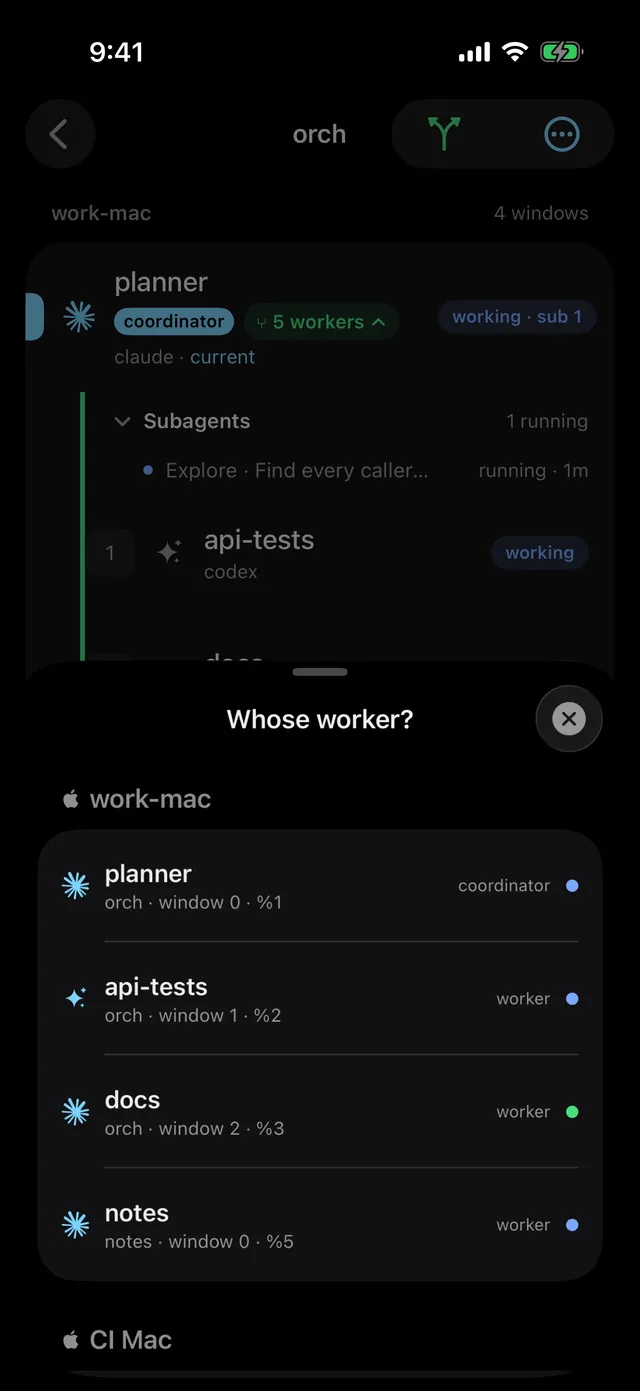
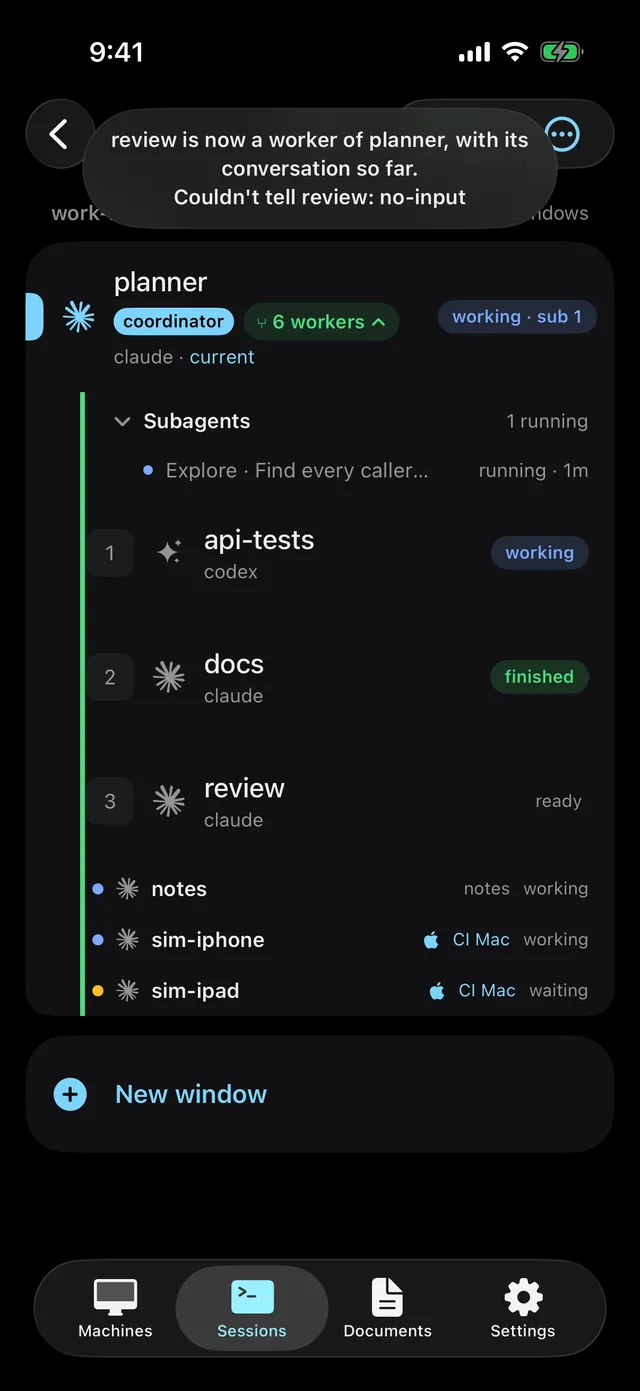
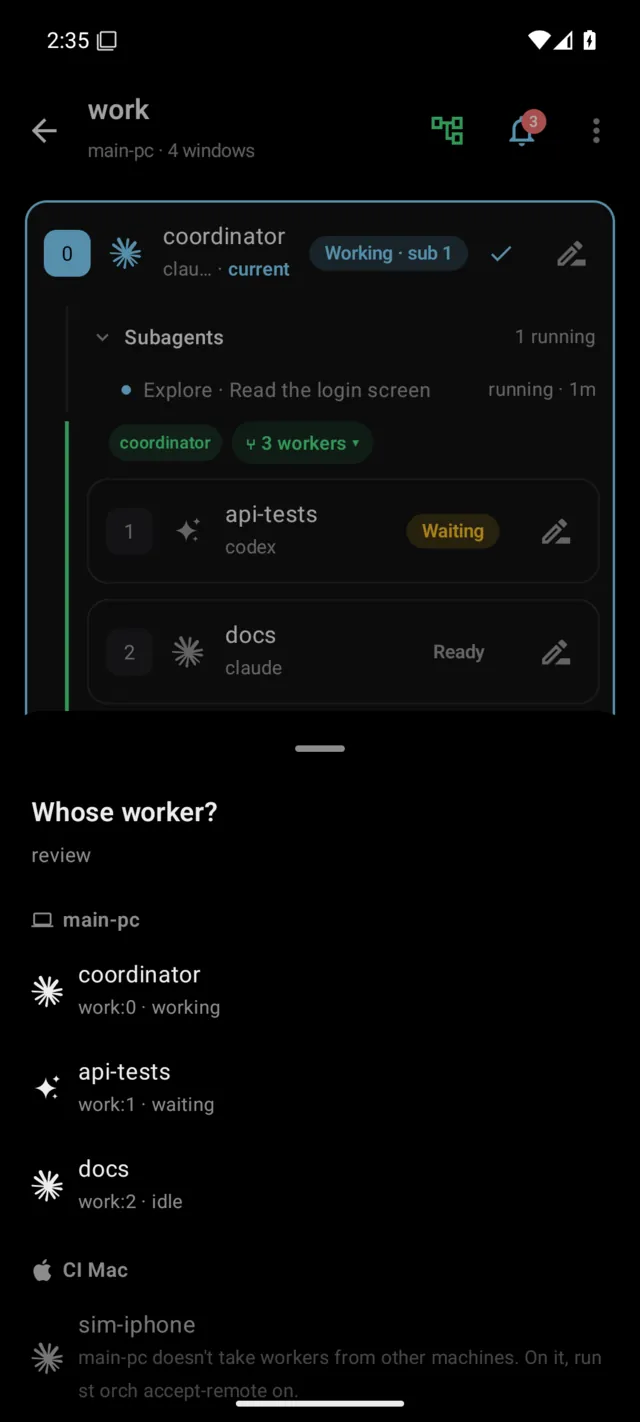
On the phone. In a window list, long-press an agent's window, or long-press a card in the Agents chart, and pick Make a worker of…. The Whose worker? sheet lists the agent panes of every machine on the account (this machine first), leaving out the agent itself and the ones already under it. Pick one and it says "api-tests is now a worker of coordinator, with its conversation so far." If an agent could not be told, "Couldn't tell api-tests:" comes with it, and why. To let a worker go, long-press it and pick Release. VoiceOver and TalkBack offer the same actions by name.
With a command. From the pane of the agent that is to direct (or naming it
with --parent). Usually you ask the agent: "adopt %15 as your worker and give
it the tests".
st worker adopt %15                 # a worker of this pane
st worker adopt %15 --parent %12    # a worker of %12
st worker adopt %15 --owns "web/**" # and what it may change
st worker release %15               # let it go
st tells both agents in one line each: the parent gets the worker's id and the
commands to give it work (st worker send, read, wait); the worker learns
whose worker it is and to report with st worker done when it finishes a task.
From then on it is a worker like any other.
Two more things come with adopting (st 0.3.93 or later):
- A role. Run from a terminal,
st worker adoptasks why the agent is brought in, unless you give--role "<why>". The role shows under the worker's name;st worker about <id> "<role>"changes it,--cleartakes it off. - A brief. When the adopted agent's turn ends, st asks it for up to five
lines on what it has done so far, which it answers with
st worker brief --summary.st worker readshows it, andst worker wait <id> --briefwaits for it.--no-briefadopts without asking.
st worker send %15 "Add tests for the auth module. Done when go test ./internal/auth passes."
st worker wait %15
st worker read %15- An adopted worker has no task file: its work comes with
st worker send. No need to explain again what it already knows. - When an agent is on a question or permission screen and its input is not
showing, st does not type the note. The adoption still happens, and the
result says who was not told and why: tell it yourself once the screen is
gone, or with
st worker send. - Both must be agents. Adopting itself, an agent already below it (a loop), or going deeper than the limits above (two levels in a run, four in the whole chain) is refused.
- An agent with workers of its own comes in as a team; see the next section.
- Let go, it is what it was before. In the app, hover the worker's card and
click
Release.st worker stopdoes not close an adopted worker: it was someone's session first.
A team as a worker
A team is not made; it happens. A coordinator is a seat, not a fixed role at
the top, so an agent that directs workers of its own can be adopted like any
other, and the moment it is, it and its workers become a team with it as the
lead. Drag the head row of its card in the sidebar onto another agent's row,
or run st worker adopt on it. The whole team comes along, nobody's conversation is
lost, and to the new coordinator it is one worker. The new coordinator may
itself be someone's worker already. This needs st 0.3.88 or later (on both
machines when the lead is on another one).
- The lead keeps its run. It joins the new coordinator's run as one worker,
and its own workers still work for it; nothing changes for them. The lead's
st worker liststill shows its team. - Work goes to the lead only. The new coordinator gives the task to the
lead with
st worker send. The lead splits it among its team, waits for them, checks their results and reports once for the whole team withst worker done --summary. st tells both agents so when it adopts the team, and the guides say the same. - Waiting and reading.
st worker waitwith no ids waits for this pane's own workers, so it waits for the lead and not for the lead's workers.st worker read <lead>gives the lead's last answer and its report for the team. - On screen.
st worker listshows the team under its lead, or(team N)on the lead's row when the team is not listed (--depth 1, another machine), and the lead hasteam of Nafter its name in the sidebar and the agent graph (desktop app 0.1.33 or later, the web terminal from st 0.3.88). - Depth. Inside the team, depth counts from the lead, so its workers can still start workers of their own. The whole chain, from the top coordinator down, is at most four levels. st refuses the adoption when the new coordinator plus one level would go past two levels in its own run, or when the new coordinator's chain plus one plus the team's own depth would go past four.
- Releasing lets go of the lead alone. It is its team's coordinator again, with its team under it.
With st 0.3.87 or earlier an agent with workers could be adopted only while the
whole stack stayed within two levels, and it then moved into the new
coordinator's run, so its own st worker list lost sight of its workers.
Bringing in a session that already has the context
A session you have been talking to for a while knows the code and the decisions, so its work needs less explaining than a fresh worker's. To bring it in as it is:
- Find the session's id. In its pane, run
echo $TMUX_PANE, or look it up inst lsor the desktop app's agent graph. It looks like%15. - Ask the agent that should be its parent. For example: "adopt %15 as your
worker and give it the auth tests, it already knows that module." The parent
runs
st worker adopt %15. You can run it yourself too, in the parent's pane or with--parent. - Give it work. The parent sends with
st worker send %15 "<the work>", waits withst worker wait %15, and reads withst worker read %15. - Let it go when it is done.
st worker release %15, orReleasein the app. The session goes back to being your conversation.
Agents you can mix
Parents and workers can be Claude Code or Codex, mixed: a Codex worker under a
Claude coordinator, or a Claude worker under a Codex one. A new worker is
picked with st worker start --agent claude|codex|opencode|pi; adopting takes whichever is
already running. An agent in another tmux session works too, and so does one on
another machine of the account (st worker adopt ci-mac/%7, see
Workers on other machines).
Claude Code background sessions
A conversation sent to the background runs under Claude's daemon, outside tmux, and its pane only shows it. From st 0.3.83 st takes that session's hooks to the pane whose title is the session's name, so its turns, questions and subagents show on that pane. With two panes of the same name, st does not guess.
After a tmux restart
Who works for whom is kept with the tmux panes, and a run's record names its coordinator and workers by pane id. When the tmux server goes down and st restores the sessions, every pane comes back with a new id, and the old ids may go to other panes. From st 0.3.88:
- The relations come back. Within about ten seconds st finds every
coordinator and worker again, on the pane that took its place, or by its
conversation for an agent you resumed by hand in another window
(
claude --resume), and puts the relations back. The sidebar card, the agent graph,st worker listandst worker waitthen work with the new ids. - What you let go stays let go. st does not put back a relation that was released or cleared on purpose, and never takes a pane that belongs to another run.
- Workers on other machines are told their coordinator's new pane; see Workers on other machines.
- A worker whose coordinator cannot be found shows
(parent gone)inst worker listand ⚠ with Release in the sidebar. A coordinator still finds its run inst worker list. - By a key, not a pane number (st 0.3.97 or later). Each coordinator and
worker is found again by a key kept on its pane, on both machines, so a
worker on another machine is never told about a pane that only took its
parent's old number. A worker whose key no pane has is
lost; adopt it again where it runs. - A run with nothing left (its coordinator in no tmux server and no
snapshot) is retired to
~/.sophonz/orch/archive.st orch unarchive <run>puts it back, and its agents are found again by their keys.
st also keeps an agent from stopping tmux by accident. st's Claude Code hook refuses these shell commands from an agent in a tmux pane, and tells the agent why and what to run instead:
tmux kill-serverwith no-Sor-L, which can reach the default server, the one holding every session of the machine.tmux kill-serverfor the server the agent itself runs in.pkillorkillallof tmux.
To stop a test server, name its socket: tmux -S <socket> kill-server. Text in
quotes or a heredoc is not refused. Codex agents are not checked yet.
A run as one file
st project keeps an orchestration run as one .sophonz file and opens it
again, on this machine or another (st 0.3.98 or later).
st project save [<run>] [-o <file>]     # this pane's run, or the one named
st project archive [<run>] [-o <file>]  # save it, then retire the run
st project show <file>                  # what is in it, and what open would do here
st project open <file> [--map <saved folder>=<folder here>]- What is in it: the run's record, its history, the handoff documents, the task files, each agent's last summary and brief, and which conversation each agent had. A run of seven agents and 55 handoff documents came to about 137 KB.
- Conversations are not in it by default.
--with-conversationsadds the agents' transcripts, which hold the code they read and the commands they ran; the file then says so in its own notes. - Opening it makes each agent's window again in the same tree, by its key.
An agent whose conversation is on this machine (or in the file) resumes it.
One whose conversation is not here starts a new one and is given what st
kept of its part: its role, its last summary and its handoff documents.
st project opensays which, for every agent. Workers on other machines are not opened here. - A folder that is not on this machine is asked for, or given with
--map. Without either, nothing is changed andopenexits with code 3. - Archiving saves the file and retires the run to
~/.sophonz/orch/archive. Opening the file again, orst orch unarchive, brings it back.
In the desktop app (0.1.43 or later) it is File → Open Project… (⌘O,
Ctrl+Shift+O on Windows and Linux), Save Project… (⌘S, Ctrl+Shift+S)
and Archive Project…. Closing a session that holds a run's coordinator asks
first: Archive, Save as Project… or Cancel.